
Why Image Lazy Loading Boosts Performance and UX
Images are often the heaviest assets on a webpage—and when they load all at once, they can drastically slow down your website. That’s where lazy loading comes in. This simple yet powerful technique ensures images only load when they become visible on the screen, improving both speed and user experience (UX).
In this article, we break down why lazy loading matters, how it works, and how JumboNIC helps you implement it effectively.
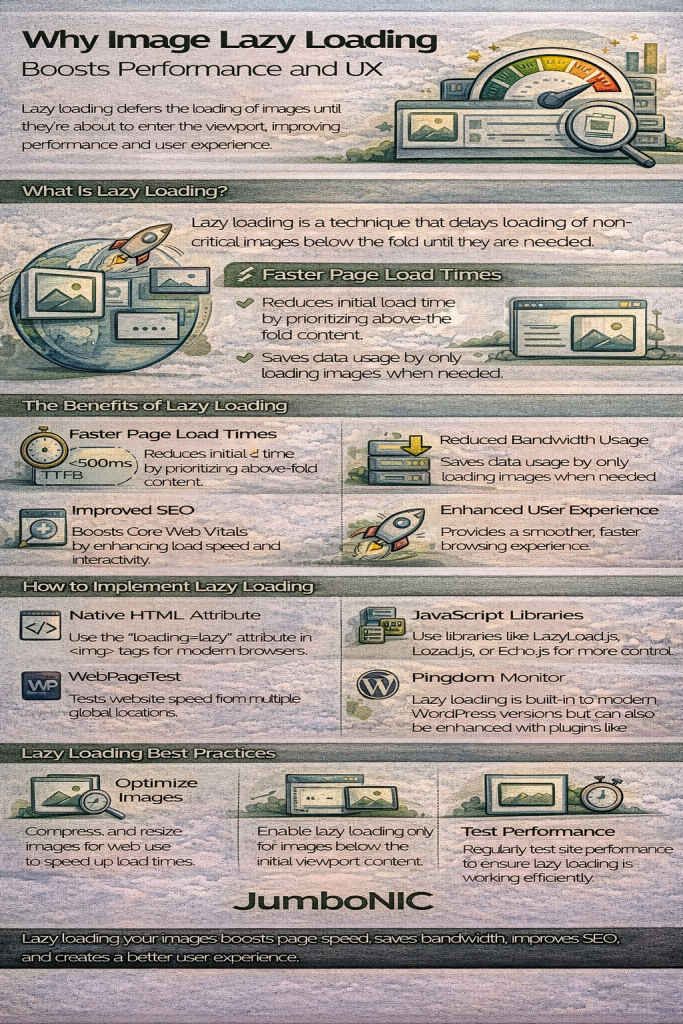
What Is Image Lazy Loading?
Lazy loading is a technique that delays loading non-critical images until the moment users scroll near them.
Instead of loading dozens of off-screen images immediately when a user lands on your page, lazy loading loads:
✔ Images above the fold (visible on page load)
✔ Images below the fold only when needed
This reduces the initial load time and improves overall performance—especially on mobile devices or slow connections.
Why Lazy Loading Is Essential for Performance
Lazy loading isn’t just a nice-to-have; it’s a core performance technique recommended by Google and built into modern browsers.
Here are the top benefits:
1. Faster Initial Page Loads
Images are typically the largest elements on a webpage. If a site loads all images at once, the browser is burdened with unnecessary work.
Lazy loading:
Reduces the amount of data loaded upfront
Improves LCP (Largest Contentful Paint)
Boosts Core Web Vitals
This means faster load times and better rankings on Google.
With JumboNIC:
JumboNIC’s optimized server stack and CDN help deliver images quickly while fully supporting lazy loading to maximize speed.
2. Saves Bandwidth for Users and Servers
Without lazy loading, users download images they may never scroll to.
Lazy loading saves:
User data (especially important on mobile)
Server bandwidth
CDN transfer costs
This leads to a more efficient, cost-friendly website for both the visitor and the site owner.
JumboNIC Bonus:
JumboNIC compresses and optimizes images at the edge with WebP/AVIF support—making lazy-loaded images even smaller.
3. Reduces CPU and Memory Usage
Loading too many images at once increases a browser’s CPU load, memory usage, and rendering time.
Lazy loading minimizes this by:
Only making the browser process one image at a time
Reducing layout shifts
Improving overall device performance
This is especially crucial for low-end mobile devices, which struggle with image-heavy pages.
4. Better User Experience (UX)
Lazy loading improves UX in several ways:
✔ Faster content visibility
Users see the important content immediately without delays.
✔ Smoother scrolling
The page feels more responsive without the lag caused by heavy resources.
✔ Less layout shifting
Combined with proper placeholders, lazy loading creates stable visual structure.
With JumboNIC:
JumboNIC ensures images load from the nearest CDN node, reducing any perceived delay during lazy load events.
5. Improves SEO and Core Web Vitals
Google’s ranking algorithms prioritize high-performing sites with strong Core Web Vitals.
Lazy loading directly boosts:
LCP (loads the main image faster)
FID/INP (reduces scripting delays)
CLS (prevents shifting)
TTFB (server responds faster with fewer assets requested)
Lazy loading is a recommended best practice in PageSpeed Insights—and JumboNIC’s optimized hosting stack helps you score higher with minimal effort.
6. Great for Image-Heavy Platforms
Lazy loading is almost mandatory for:
E-commerce stores
Photography websites
News and media sites
Blogs with long posts
Portfolio sites
Instead of overwhelming the browser with dozens or hundreds of images, lazy loading ensures a controlled, smooth experience.
JumboNIC Advantage:
JumboNIC’s CDN caches images worldwide, making lazy-loaded items appear instantly as users scroll.
How Lazy Loading Works (Simple Explanation)
Modern HTML makes lazy loading incredibly easy. Simply add:
<img src="image.jpg" loading="lazy" alt="Example">
The browser handles the rest automatically.
Under the hood, the browser:
Detects whether the image is near the viewport
Loads it only when needed
Renders it seamlessly
Prevents unnecessary downloads
When combined with a fast host like JumboNIC, lazy loading becomes even more powerful.
JumboNIC + Lazy Loading = Maximum Performance
Lazy loading is powerful, but it works even better on a fully optimized hosting platform. Here’s how JumboNIC enhances lazy loading performance:
🚀 1. Ultra-Fast Edge CDN Delivery
Images load from the nearest global server.
🔥 2. Automatic Image Compression (WebP/AVIF)
Your lazy-loaded images weigh less and load faster.
⚡ 3. High-Speed NVMe Hosting
Reduces backend overhead and improves TTFB.
🧠 4. Full-Page and Object Caching
Decreases server load when images trigger additional requests.
🌍 5. HTTP/3 + Brotli Compression
Modern protocols ensure smooth, low-latency lazy load behavior.
Together, these tools create a lightning-fast image delivery experience.
Conclusion
Image lazy loading is one of the simplest and most effective ways to boost website speed and enhance user experience. By loading only what’s needed, you save bandwidth, improve Core Web Vitals, and give users a smoother, faster browsing experience.
When paired with a performance-focused hosting provider like JumboNIC, lazy loading becomes even more impactful—delivering optimized images globally with speed and efficiency.
