
📊 How to Understand Google Analytics Reports
Featuring JumboNIC
Google Analytics (GA) is a powerful tool for tracking your website’s performance. But for beginners, all the numbers, graphs, and terminology can feel overwhelming.
This guide breaks it down into simple, actionable insights, so you can make data-driven decisions for your website — especially if you’re hosting with JumboNIC.
🧠 Why Google Analytics Matters
With GA, you can:
Track how many visitors come to your site
Understand which pages are popular
Identify traffic sources (Google, social media, referral sites)
Measure conversions, leads, and sales
In short, Google Analytics shows what’s working and what needs improvement.
🟦 Step 1: Accessing Your Reports
Log in to your Google Analytics account
Select your website property
Navigate to the Reports section
Key categories you’ll see:
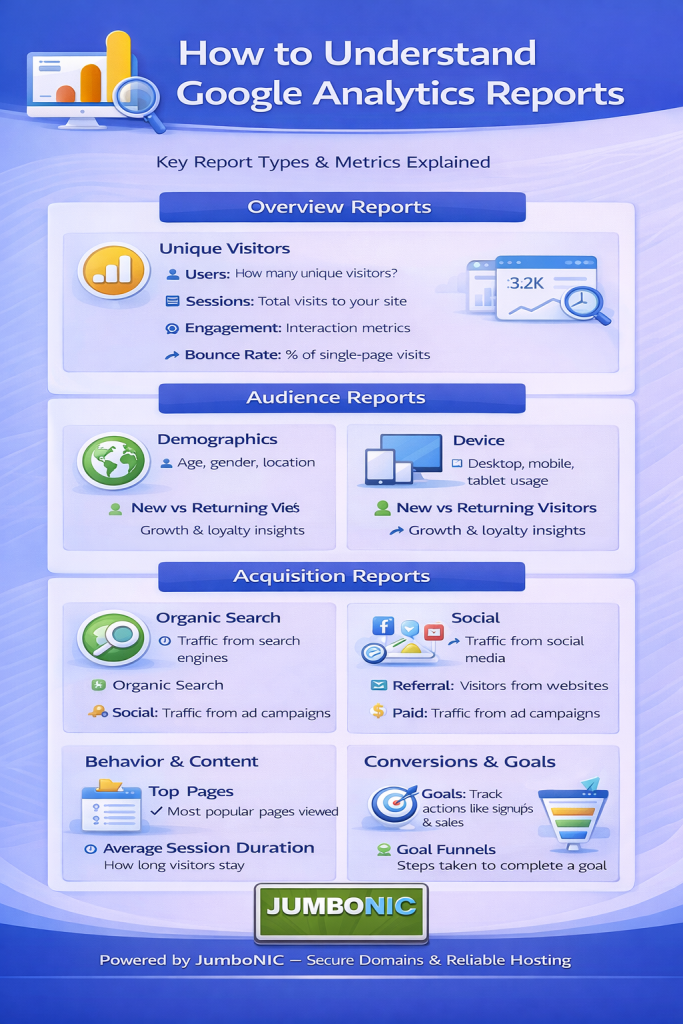
| Report | What It Shows |
|---|---|
| Realtime | Live visitors on your site, pages being viewed, locations |
| Audience | Demographics, location, devices used, new vs returning visitors |
| Acquisition | How visitors found your site (search engines, social media, ads) |
| Behavior | Pages visited, time on page, bounce rate |
| Conversions | Goals completed, such as form submissions, purchases, or downloads |
🟩 Step 2: Key Metrics You Should Know
| Metric | What It Means | Why It Matters |
|---|---|---|
| Sessions | Number of visits | Measures overall traffic |
| Users | Unique visitors | Helps understand your audience size |
| Pageviews | Total pages viewed | Shows content popularity |
| Bounce Rate | % of visitors leaving after one page | High rate = page may not engage |
| Average Session Duration | How long users stay | Longer = more engaging content |
| Acquisition Channels | Where traffic comes from | Helps focus marketing efforts |
🟦 Step 3: Understanding Your Audience
The Audience report shows:
Demographics → Age, gender
Location → Countries, cities
Devices → Desktop, mobile, tablet
Example: If most users are on mobile, make sure your site is mobile-friendly.
JumboNIC hosting ensures fast loading across all devices.
🟩 Step 4: Tracking Traffic Sources
The Acquisition report tells you how visitors find your website:
Organic Search → Google search results
Direct → Typed your URL directly
Referral → Linked from other websites
Social → Social media platforms
Focus on sources that drive the most valuable traffic, and optimize your marketing accordingly.
🟦 Step 5: Behavior & Content Analysis
The Behavior report reveals:
Top-performing pages → Which content is most popular
Average time on page → Measures engagement
Exit pages → Where visitors leave
Tip: Optimize underperforming pages with better content, faster loading, or clear calls-to-action.
JumboNIC’s fast servers improve page load speed, which reduces bounce rates and improves GA metrics.
🟩 Step 6: Conversion Tracking
Conversions are actions you want visitors to take, such as:
Filling out a contact form
Purchasing a product
Downloading a PDF guide
Use Goals in Google Analytics to track these:
Go to Admin → Goals → New Goal
Choose a template or custom goal
Define your goal type (destination, duration, pages/screens per session, event)
Save
Now GA tells you how well your site drives results.
🏆 Why JumboNIC Hosting Makes Analytics More Accurate
| JumboNIC Feature | Benefit for Google Analytics |
|---|---|
| Fast server performance | Reduces bounce due to slow loading |
| Reliable uptime | Ensures accurate visitor tracking |
| Mobile-optimized hosting | Tracks mobile visitors correctly |
| Expert support | Helps troubleshoot analytics issues |
With JumboNIC, your GA reports reflect real-world visitor behavior, not errors caused by slow servers or downtime.
🎯 Quick Tips for Beginners
Focus on sessions, users, and top pages first
Check bounce rate — if high, improve page speed/content
Monitor traffic sources — know which channels work best
Track conversions — set realistic goals
Use data to make improvements, not just look at numbers
🎉 Final Takeaway
Understanding Google Analytics doesn’t have to be complicated.
With this guide, you can:
See where your traffic comes from
Know what content works
Track conversions
Make data-driven decisions to grow your website
And with JumboNIC hosting, your website runs fast, secure, and reliably — giving you accurate analytics for better insights and SEO performance.
