
How to Recover a Hacked Website: Step-by-Step Guide by JumboNIC
Few experiences are as alarming as discovering that your website has been hacked. From defaced pages and malicious redirects to stolen data and downtime, a cyberattack can cause serious damage to your business and brand reputation.
But don’t panic — recovery is possible. At JumboNIC, we specialize in helping website owners detect, clean, and restore compromised sites quickly and safely. In this guide, we’ll walk you through the steps to recover a hacked website, minimize damage, and prevent future attacks.
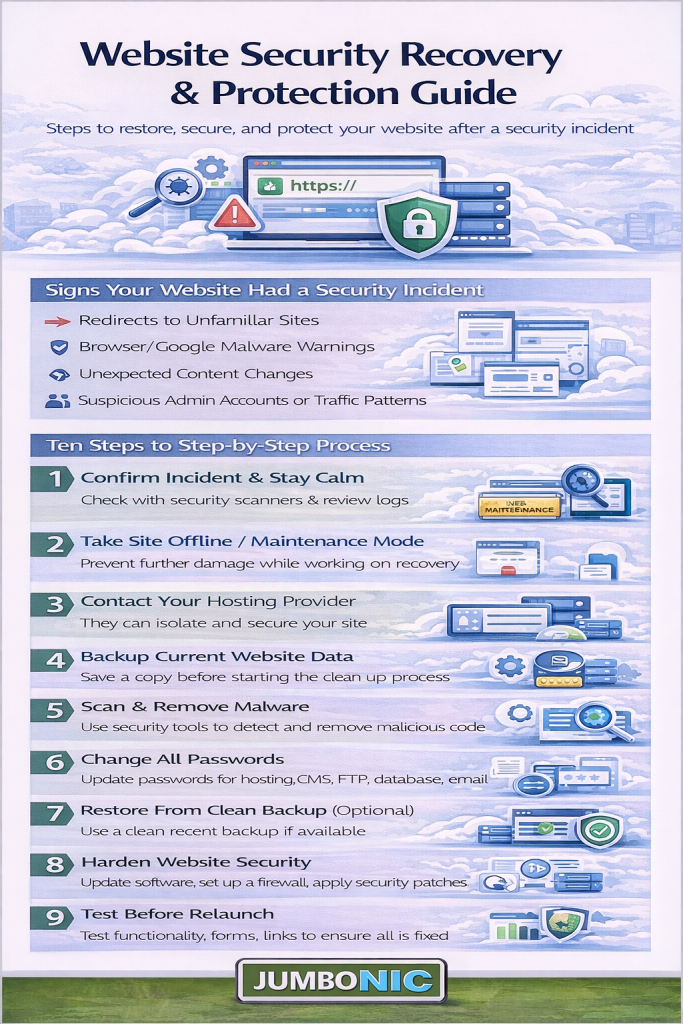
1. Stay Calm and Assess the Situation
The first step is to stay calm and avoid hasty actions. Taking your site offline immediately or deleting files could make recovery harder.
Instead:
Confirm the hack — check for unusual redirects, unknown users, or strange content.
Note any visible changes (defaced homepage, unauthorized ads, pop-ups).
Identify whether the issue affects your whole site or just specific pages.
JumboNIC Tip: If your site is hosted with JumboNIC, our Security Monitoring Center automatically detects and isolates suspicious activity, helping you identify the type and scope of attack faster.
2. Take Your Website Offline (Temporarily)
Once you’ve confirmed a breach, limit further damage by taking your site temporarily offline.
You can do this by:
Putting the site in maintenance mode.
Blocking external access through your control panel or
.htaccessfile.Preventing search engines from crawling compromised pages (using “noindex” if necessary).
JumboNIC Safety Feature: You can activate Safe Mode Hosting from your JumboNIC dashboard to pause your site’s live access while preserving full access for cleanup and analysis.
3. Scan Your Website for Malware and Vulnerabilities
Use a website malware scanner to detect infected files, scripts, and unauthorized changes.
Recommended tools and methods:
Run a server-side malware scan.
Check for suspicious code in core files (like
index.php,wp - config.php, etc.).Use JumboNIC’s Advanced Threat Scanner for automated deep scans that identify hidden backdoors and malicious injections.
Once you find the source of infection, note the file names and locations for cleanup.
4. Change All Passwords and Credentials
Immediately change:
Admin and CMS passwords
FTP/SFTP and database credentials
Hosting account and email logins
API keys or integrations
JumboNIC Pro Tip: Use strong, unique passwords and enable two-factor authentication (2FA) to prevent re-entry by attackers.
5. Restore Your Website from a Clean Backup
If you have a recent, clean backup, restoring it is often the fastest and safest way to recover your site.
Steps to restore safely:
Verify that the backup predates the hack.
Restore the files and database through your hosting control panel.
Test the site in a secure environment before going live again.
JumboNIC Advantage: With AutoBackup Vault, JumboNIC stores daily, versioned backups that can be restored in one click — even if your main files are compromised.
6. Manually Remove Malicious Code (If No Backup Exists)
If no clean backup is available, you’ll need to manually clean infected files.
Look for:
Suspicious code snippets (often base64, iframe, eval, or obfuscated code).
Unauthorized admin accounts.
Modified
.htaccessor configuration files.
After cleaning, re-upload clean files via SFTP and re-scan the site.
JumboNIC’s SiteGuard AI automatically detects and removes malicious code across your hosting environment while preserving legitimate data.
7. Check and Update Your CMS, Plugins, and Themes
Outdated software is one of the most common reasons websites get hacked.
After cleanup, make sure to:
Update your CMS (WordPress, Joomla, etc.) to the latest version.
Update all plugins, themes, and third-party integrations.
Delete unused or abandoned extensions.
JumboNIC Insight: Our AutoPatch system automatically applies critical security updates as soon as they’re released, reducing your exposure window.
8. Request a Security Review and Reindexing
If Google or other search engines flagged your site as unsafe, you’ll need to request a review after cleaning.
Steps:
Verify your site in Google Search Console.
Submit a Security Review Request explaining that your site has been cleaned.
Monitor for “Safe Browsing” clearance notifications.
JumboNIC Support Team assists customers with this process, ensuring your site regains search trust as quickly as possible.
9. Strengthen Your Future Security
Recovering your site is only half the battle — the next step is to prevent future attacks.
Best Practices:
Enable a Web Application Firewall (WAF).
Schedule regular security scans and audits.
Use HTTPS/SSL for encrypted connections.
Monitor login activity and file integrity continuously.
JumboNIC Protection Suite offers 24/7 automated monitoring, threat blocking, and AI-based defense mechanisms — so you can focus on growth, not recovery.
Final Thoughts
A hacked website can feel devastating, but with the right steps and tools, recovery is entirely achievable.
By staying calm, identifying the root cause, and working systematically, you can not only regain control but also come back stronger and more secure.
At JumboNIC, we make that process faster, safer, and easier — combining automated protection, instant recovery, and expert support to keep your site safe around the clock.
🔒 Recover and Protect with JumboNIC
Don’t let a hack define your online presence. With JumboNIC’s security-first hosting, you get real-time protection, backup recovery, and smart monitoring built right in.
Visit www.jumbonic.com to learn more about how we can help you secure, recover, and future-proof your website.
