
How to Monitor Your Website for Security Threats: A Complete Guide by JumboNIC
In the digital age, website security is not optional — it’s essential. Cyberattacks, malware infections, and data breaches can destroy your reputation and disrupt your business operations.
At JumboNIC, we understand that protecting your website means more than just setting up firewalls. It requires continuous monitoring, smart automation, and real-time threat intelligence to stay one step ahead of cybercriminals.
In this guide, we’ll explore how to effectively monitor your website for security threats — and how JumboNIC’s advanced protection tools can help safeguard your online presence.
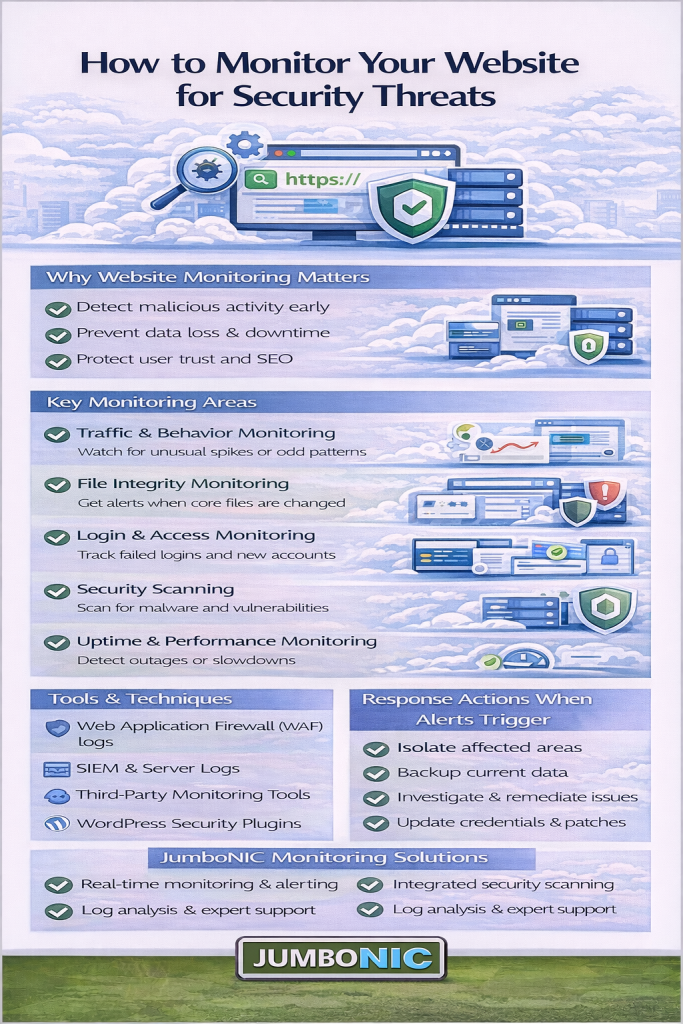
1. Why Website Security Monitoring Matters
Every minute, thousands of websites are attacked — from small business blogs to global enterprises. Common threats include:
Malware and ransomware infections
DDoS (Distributed Denial-of-Service) attacks
SQL injections and cross-site scripting (XSS)
Phishing attempts and credential theft
Without proper monitoring, these attacks can go unnoticed for weeks — costing you customers, data, and search engine trust.
JumboNIC Insight: Google blacklists over 10,000 websites daily for malware or phishing. Constant monitoring helps you avoid being one of them.
2. Use Real-Time Threat Detection Tools
Real-time threat detection is the foundation of any good security strategy. It continuously scans your site for unusual activity, file changes, and vulnerabilities.
Recommended tools and features:
Web Application Firewalls (WAF) – Filters malicious traffic before it reaches your server
Intrusion Detection Systems (IDS) – Identifies suspicious activity patterns
Automated malware scanners – Detect infected files and scripts
JumboNIC Advantage: Our platform includes 24/7 security scanning, WAF protection, and real-time malware detection to stop attacks before they cause harm.
3. Monitor Login Attempts and User Behavior
Unauthorized logins are a major threat vector. Monitoring admin activity, login attempts, and file edits can help you spot intrusions early.
Best Practices:
Limit login attempts and use CAPTCHAs
Enable two-factor authentication (2FA)
Track user IP addresses and access times
JumboNIC Pro Tip: Use our SmartAuth system to automatically detect and block suspicious login attempts, even before they reach your dashboard.
4. Keep Your Software and Plugins Updated
Outdated software is one of the biggest security risks. Hackers often exploit known vulnerabilities in old CMS versions, plugins, or themes.
What to do:
Enable automatic updates for your CMS, plugins, and themes
Regularly remove unused extensions
Monitor for vulnerability alerts from trusted sources
JumboNIC Security Suite automatically scans your environment and alerts you if any component becomes outdated or vulnerable.
5. Use File Integrity Monitoring (FIM)
File Integrity Monitoring tracks changes in your core website files. If a hacker modifies, deletes, or adds a suspicious file, you’ll get an immediate alert.
JumboNIC Solution: Our FIM system records file hashes and continuously compares them to secure baselines — instantly flagging unauthorized changes.
6. Monitor Network and Server Activity
Cyberattacks often start at the network level. Monitoring your traffic patterns, bandwidth usage, and server logs helps identify DDoS attempts or brute-force attacks early.
How to monitor effectively:
Set traffic thresholds and receive alerts for spikes
Track outgoing data requests to prevent data exfiltration
Use monitoring dashboards for visual insights
JumboNIC Infrastructure offers integrated server-level monitoring, helping you detect suspicious traffic before it impacts performance.
7. Set Up Automated Alerts and Reports
Manual monitoring isn’t scalable. Automated alerts ensure you’re notified the moment something unusual happens.
Examples of automated alerts:
Sudden traffic surges or downtime
File changes or malware detection
Failed login attempts or unauthorized access
JumboNIC Dashboard allows you to customize security alerts, sending notifications via email, SMS, or directly to your management system.
8. Perform Regular Security Audits and Backups
Even with continuous monitoring, it’s essential to perform routine security audits. Audits help you find overlooked weaknesses and ensure compliance with data protection regulations.
Audit Checklist:
Review access permissions
Scan for vulnerabilities
Test your backup and recovery plan
JumboNIC Backup Vault keeps encrypted, real-time copies of your website, so you can restore operations instantly after an incident.
Final Thoughts
Website security monitoring isn’t a one-time setup — it’s a continuous process that protects your business, customers, and brand reputation.
By implementing proactive monitoring, automated alerts, and secure infrastructure, you can detect and neutralize threats before they cause serious damage.
With JumboNIC’s all-in-one security and performance platform, you get enterprise-grade protection designed to keep your site safe, fast, and resilient — 24/7.
🛡️ Stay Secure with JumboNIC
Protect your digital assets with real-time monitoring, AI-powered threat detection, and automated defenses — all built into the JumboNIC hosting ecosystem.
Visit www.jumbonic.com to learn more about how we help businesses stay safe online.
