
How to Create a Website Launch Checklist for Clients
Launching a website is an exciting milestone, but it’s also a critical stage where mistakes can impact user experience, SEO, and security. A comprehensive website launch checklist ensures that every detail is verified, preventing costly oversights and guaranteeing a smooth launch.
This guide walks you through how to create a website launch checklist for clients, and how JumboNIC hosting can simplify the process by providing reliable, secure, and high-performance infrastructure.
Why a Website Launch Checklist Is Essential
Avoid Oversights – Ensure nothing is missed, from broken links to missing metadata.
Guarantee Quality – Confirm that all functionality, design elements, and content are working properly.
Improve Client Satisfaction – A structured checklist demonstrates professionalism and builds trust.
Enhance SEO and Performance – Verify technical SEO, speed, and mobile responsiveness before going live.
Reduce Post-Launch Issues – Catch errors early, avoiding downtime or costly fixes later.
Key Components of a Website Launch Checklist
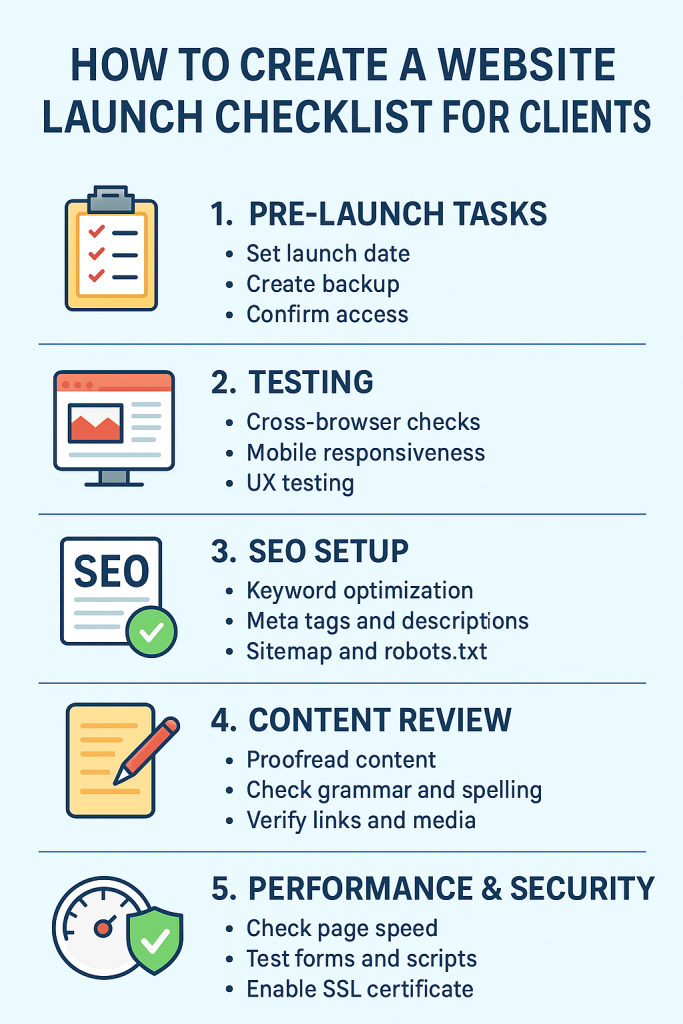
1. Pre-Launch Testing
Browser and Device Testing – Ensure the site works on Chrome, Safari, Edge, Firefox, and mobile devices.
Functionality Checks – Test forms, search, login systems, e-commerce carts, and contact pages.
Performance Tests – Page speed, image optimization, and caching checks. JumboNIC’s NVMe SSD hosting and CDN help achieve fast load times.
2. SEO and Content Review
Metadata – Ensure titles, descriptions, and alt tags are complete.
URLs and Permalinks – Check for broken links or redirects.
Structured Data – Implement schema markup for products, articles, and events.
Blog and Page Content – Proofread text and verify images display correctly.
3. Security and Backup
SSL Certificate – Verify HTTPS is active; JumboNIC provides free SSL certificates.
Site Backups – Take a full pre-launch backup. JumboNIC includes daily automated backups for peace of mind.
Security Scans – Check for malware or vulnerabilities.
4. Analytics and Tracking
Google Analytics / GA4 – Ensure tracking is installed correctly.
Google Tag Manager – Verify event tracking for forms, clicks, or conversions.
Google Search Console – Submit sitemap and check indexing readiness.
5. Hosting and Domain Setup
Domain Connection – Confirm DNS settings are correct and SSL is active.
Server Configuration – Ensure PHP version, caching, and security settings are optimized. JumboNIC’s hosting provides these out-of-the-box.
Email Setup – Verify domain-based email accounts are functioning properly.
6. User Experience and Accessibility
Navigation Check – Menus and internal links are intuitive.
Responsive Design – Mobile and tablet layouts are consistent.
Accessibility Testing – Use tools like WAVE or axe to ensure compliance for users with disabilities.
7. Final Launch Tasks
Soft Launch / Staging Preview – Review the site with the client on a staging environment. JumboNIC provides easy-to-use staging sites.
DNS Propagation – Monitor the transition if moving from a staging or old site.
Announcement Plan – Schedule email campaigns, social media posts, or press releases to announce the launch.
Tips for a Smooth Client Website Launch
Use a Standardized Checklist Template – Keep consistency across projects.
Collaborate with Clients – Ensure approvals for content, branding, and functionality.
Schedule a Post-Launch Review – Check analytics, performance, and user feedback after launch.
Leverage JumboNIC Tools – Staging, backups, and security scans simplify checklist tasks.
How JumboNIC Simplifies Website Launches
High-Performance Hosting – Fast page load times reduce user frustration and improve SEO.
Staging Environments – Test everything before pushing live.
Daily Backups and Restore Options – Protects the site in case of post-launch errors.
SSL and Security Features – Pre-configured SSL and DDoS protection reduce setup time.
Global CDN and HTTP/3 – Ensures a smooth experience for visitors worldwide.
By combining a detailed launch checklist with JumboNIC’s hosting tools, you can deliver professional, reliable websites that impress clients and users alike.
Conclusion
A comprehensive website launch checklist ensures a smooth transition from development to live site, improving client satisfaction, performance, and security. Key steps include pre-launch testing, SEO verification, backups, analytics setup, accessibility checks, and hosting confirmation.
With JumboNIC hosting, you gain high-speed, secure, and reliable infrastructure, along with staging and backup tools that make website launches seamless and stress-free. A thorough checklist combined with a solid hosting platform guarantees every client launch is a success.
