
🗺️ How to Create a Sitemap Automatically
Featuring JumboNIC
If you want your website to appear in Google search results, you need to help Google understand your site’s pages, structure, and updates.
That’s exactly what a sitemap does.
A sitemap is a small file that lists all the important pages on your website.
Google reads it to know:
Which pages exist
Which ones are new
Which ones to show in search results
The best part?
You can create a sitemap automatically — no coding required.
Let’s walk through it.
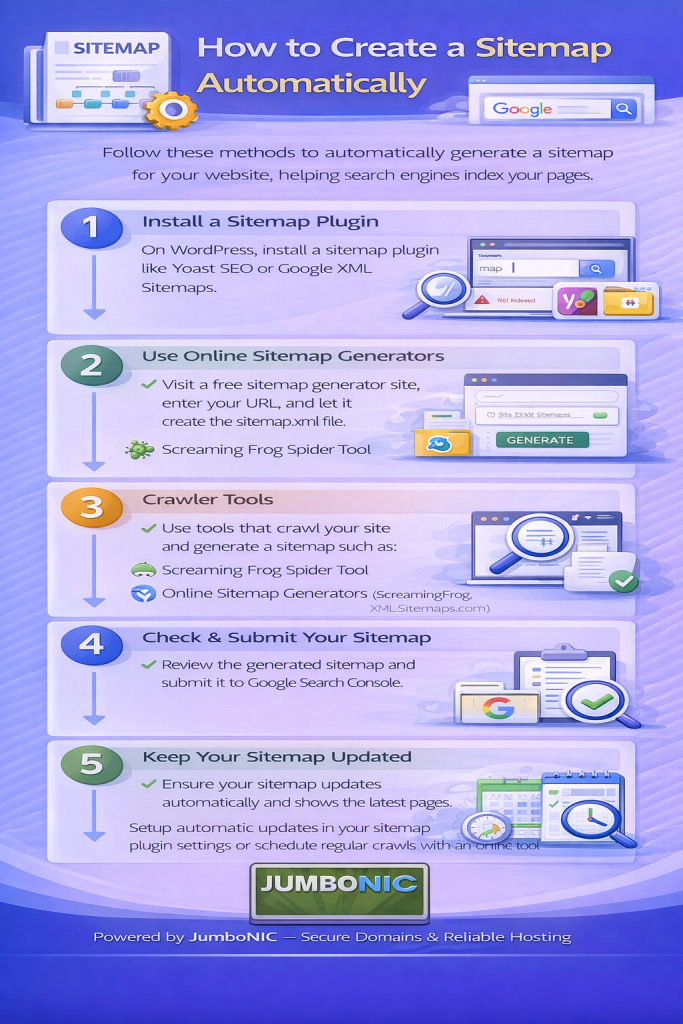
✅ Step 1: Choose Your Website Platform
First, identify what your website is built on:
| Platform | Sitemap Method |
|---|---|
| WordPress | Use a plugin (easy ✅) |
| Non-WordPress / Custom Site | Use an online generator |
| Jumlo / Drupal / Wix / Shopify | Built-in options available |
We’ll cover the most common methods below.
🟦 If Your Website Uses WordPress
Install an SEO Plugin That Generates Sitemaps Automatically
You have two great free options:
Option 1: Yoast SEO
https://wordpress.org/plugins/wordpress-seo/
Once installed:
Go to SEO Settings → General → Features
Make sure XML Sitemaps is Enabled
Your sitemap link will be:
Option 2: Rank Math SEO
https://wordpress.org/plugins/seo-by-rank-math/
Go to:
Settings → Sitemap
Enable Sitemap ✅
Done.
Your sitemap link will look similar:
https://yourwebsite.com/sitemap_index.xml
🟩 If Your Website is Not WordPress
Use a free generator tool:
Steps:
Enter your website URL
Click Start
Download the sitemap file
Upload the file to your website’s public_html folder using your hosting File Manager
Your sitemap will be at:
https://yourwebsite.com/sitemap.xml
🟧 If You Use Shopify, Wix, or Other Website Builders
Good news — they auto-create sitemaps.
| Platform | Sitemap URL |
|---|---|
| Shopify | https://yourwebsite.com/sitemap.xml |
| Wix | https://yourwebsite.com/sitemap.xml |
| Squarespace | https://yourwebsite.com/sitemap.xml |
No extra setup needed.
✅ Step 2: Submit Your Sitemap to Google Search Console
This ensures Google notices your new pages faster.
Select your website
Open Sitemaps
Paste your sitemap URL (example):
sitemap_index.xml or sitemap.xml- Click Submit
Google will now start indexing your pages.
🚀 Why Hosting Matters for Sitemap Crawling
Even with a perfect sitemap, Google needs to be able to access your site quickly.
This is where JumboNIC helps:
| JumboNIC Feature | SEO Benefit |
|---|---|
| Fast server response time | Google crawls pages faster |
| High uptime reliability | Search engines can access your website anytime |
| Free SSL support | Allows safe, trusted crawling |
| One-click CMS installs | You can start publishing content faster |
🏁 Final Takeaway
Creating a sitemap doesn’t require coding or advanced SEO knowledge.
Just remember:
Generate the sitemap
Submit it to Google Search Console
Make sure your site is hosted on a fast, stable server like JumboNIC
This helps Google discover and index your pages faster, which improves your visibility in search results.
