
How to Test and Benchmark Your Hosting Performance
Choosing the right hosting provider is essential—but verifying its performance is even more important. A host may promise speed, uptime, or optimized infrastructure, but real-world performance depends on measurable data, not marketing claims.
In this guide, we’ll break down how to test, benchmark, and analyze your hosting performance—and show how JumboNIC helps you achieve consistently strong results.
Why Benchmarking Your Hosting Matters
Many website owners only evaluate their hosting when something goes wrong—slow loading, downtime, or random performance drops. Regular benchmarking helps you:
Catch performance issues early
Compare hosting providers objectively
Optimize your site for better UX and SEO
Understand whether it’s time to scale up
Make data-driven decisions for long-term growth
With proper testing tools and techniques, you can see how your hosting truly performs under real traffic conditions.
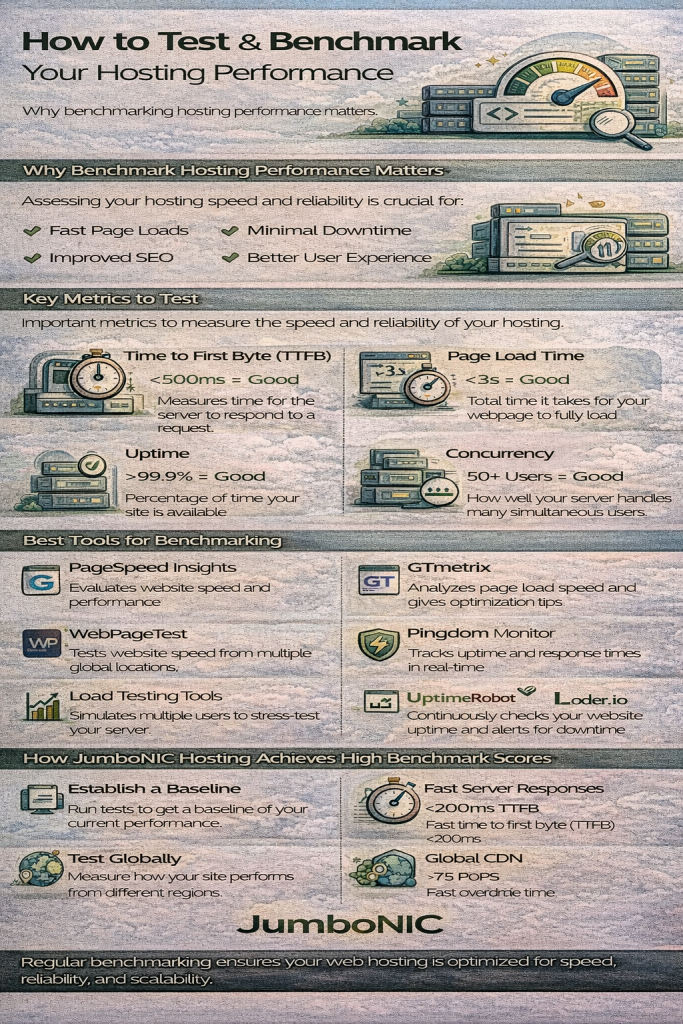
Key Performance Metrics to Test
Before running benchmarks, you need to know which metrics matter most.
1. Time to First Byte (TTFB)
Measures how fast the server responds to the initial request.
Lower TTFB = faster hosting.
2. Page Load Time
How long it takes for a page to fully load, including scripts, images, fonts, and stylesheets.
3. Server Response Time
How quickly your hosting processes dynamic content (PHP, database calls, etc.).
4. Uptime & Reliability
Represents how long your server stays online without outages.
5. Throughput & Concurrency
Shows how well your server handles traffic spikes and simultaneous users.
6. Latency Across Regions
Measures how fast your site loads for visitors in different countries.
7. CDN Efficiency
If you use a CDN (like JumboNIC’s built-in CDN), evaluate asset delivery speeds across edge nodes.
Tools to Benchmark Hosting Performance
1. PageSpeed Insights / Lighthouse
Best for measuring Core Web Vitals, TTFB, and overall speed scores.
2. GTmetrix
Provides detailed waterfall charts and loading behavior.
3. WebPageTest.org
Excellent for multistep tests, global location testing, and advanced metrics.
4. Pingdom Tools
Useful for performance overviews and historical comparisons.
5. Load Testing Tools (for Traffic Simulations)
Loader.io
k6
JMeter
These test how your server performs under increasing load.
6. Uptime Monitoring Services
UptimeRobot
StatusCake
BetterStack
These track uptime 24/7 and alert you to outages.
How to Benchmark Your Hosting (Step-by-Step)
Step 1: Test Baseline Performance
Start with PageSpeed Insights or GTmetrix to gather initial metrics:
✔ TTFB
✔ LCP
✔ Asset loading times
✔ Waterfall behavior
This establishes a performance baseline.
Step 2: Test Global Load Speeds
Using WebPageTest or Pingdom, test from multiple regions:
North America
Europe
Asia
Australia
This shows how well your hosting and CDN deliver content worldwide.
Step 3: Perform Load Testing
Simulate simultaneous users to see how your server behaves under pressure.
Questions to ask:
Does response time spike?
Does the server fail under heavy load?
Does TTFB degrade significantly?
Step 4: Monitor Uptime
Use an external uptime tracking tool for at least one week.
Ideal uptime: 99.9% or higher.
Step 5: Evaluate Database Performance
With tools like Query Monitor (WordPress) or built-in server logs:
Identify slow queries
Check query times
Monitor database CPU usage
Step 6: Compare With Optimized Environments
If your hosting supports performance features (caching, CDN, HTTP/3), compare:
With caching ON vs OFF
With CDN enabled vs disabled
This reveals how much your hosting can accelerate your site.
How JumboNIC Helps You Achieve Better Benchmark Results
JumboNIC is built for speed, reliability, and global performance optimization. Here’s how it boosts your benchmarks:
1. Ultra-Fast TTFB with Optimized Server Architecture
JumboNIC’s NVMe-powered hosting and optimized PHP/MySQL stack deliver extremely low TTFB—one of the most impactful speed metrics.
2. Global CDN for Faster Worldwide Delivery
JumboNIC includes a built-in Anycast CDN, ensuring your site loads fast from any region.
3. Redis Object Caching for Faster Database Queries
Dynamic websites (WordPress, WooCommerce, Laravel apps) see huge improvements when Redis caching reduces database load.
4. Smart Full-Page Caching
JumboNIC automatically caches static pages, reducing server processing time and improving Core Web Vitals.
5. Real-Time Analytics & Performance Tools
JumboNIC’s dashboard helps you monitor:
Resource usage
Traffic patterns
Cache performance
Global response times
6. HTTP/3, Brotli Compression & QUIC
These modern protocols significantly improve site speed, especially on mobile networks.
7. High Uptime Reliability
JumboNIC’s stable infrastructure provides uptime suitable for both small websites and mission-critical applications.
8. Seamless Scalability for Load Testing
When your benchmarks show increased demand, JumboNIC allows you to easily scale CPU, RAM, storage, or move to a dedicated setup—without downtime.
Tips to Improve Your Hosting Benchmark Scores
Here’s how you can improve your results during testing:
✔ Enable full-page caching
✔ Use a CDN for all static assets
✔ Optimize images (AVIF/WebP)
✔ Minify CSS & JavaScript
✔ Optimize your database
✔ Use PHP 8.2+
✔ Use Redis object caching
✔ Reduce heavy plugins or extensions
JumboNIC provides built-in support for all of these optimizations.
Conclusion
Testing and benchmarking your hosting performance is essential for understanding how your website behaves under real-world conditions. By measuring key metrics such as TTFB, global load speed, uptime, and concurrency, you can identify bottlenecks and improve your site’s overall user experience and SEO.
With JumboNIC, you gain access to high-performance infrastructure, global CDN capabilities, modern caching systems, and advanced optimization tools—making it easier to achieve outstanding hosting benchmarks and deliver a blazing-fast website.
