
How to Use a CDN to Improve Site Speed and SEO
In today’s digital landscape, users expect websites to load instantly. Search engines expect the same. Fast websites earn higher rankings, lower bounce rates, and better engagement—all of which directly contribute to SEO success. One of the most powerful tools to achieve this is a Content Delivery Network (CDN).
In this article, we’ll explain how a CDN works, why it improves both performance and SEO, and how JumboNIC helps you leverage CDN technology effortlessly.
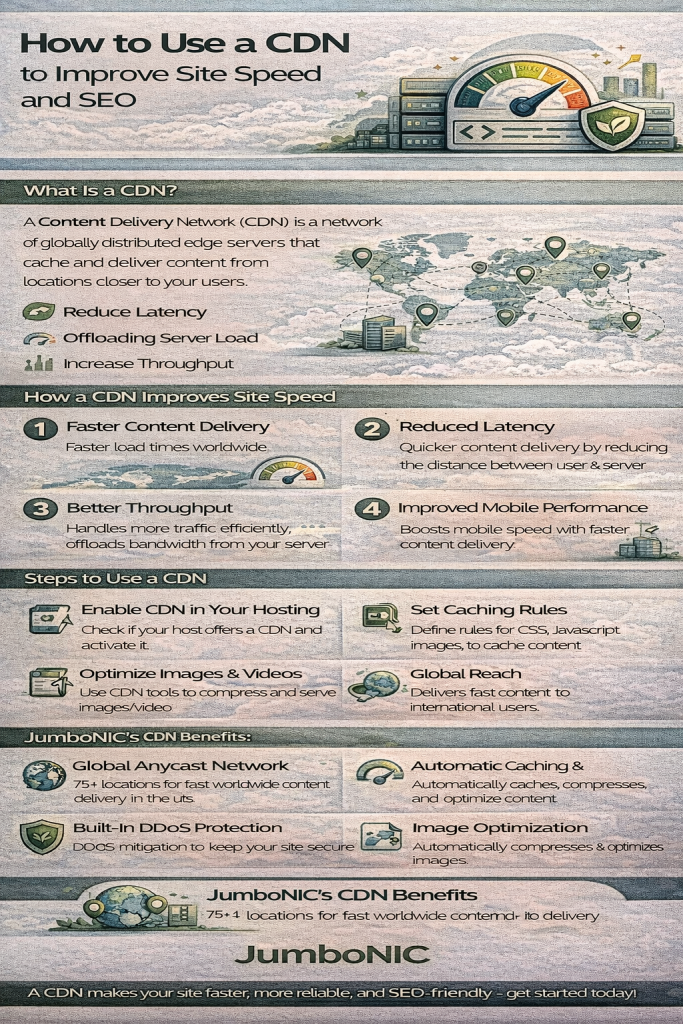
What Is a CDN?
A Content Delivery Network (CDN) is a globally distributed system of servers designed to deliver your website’s static assets—images, CSS, JavaScript, fonts, videos—faster by serving them from the server closest to the user.
Instead of every visitor connecting to your origin server, a CDN caches copies of your files in multiple geographic locations (called edge nodes).
Result: Faster delivery, lower latency, and a smoother browsing experience.
Why a CDN Improves Website Speed
1. Reduced Latency
The physical distance between a user and your server affects load times.
A CDN stores assets across worldwide data centers, dramatically reducing the distance data must travel.
2. Offloaded Server Load
Instead of your hosting server handling every request, the CDN handles most static file traffic.
This frees up resources for processing dynamic content.
3. Better Throughput
CDNs are optimized for high-speed delivery, which means efficient handling of large files, high traffic bursts, and concurrent users.
4. Faster Mobile Performance
Mobile devices often rely on slower connections.
A CDN minimizes mobile latency—boosting Core Web Vitals and overall UX.
How a CDN Boosts SEO
Google and other search engines now prioritize user experience metrics, including:
Page load time
Core Web Vitals
Bounce rate
Engagement signals
Mobile performance
A CDN improves all of these, directly supporting SEO.
SEO Benefits Include:
✔ Better Core Web Vitals
Faster LCP (Largest Contentful Paint) and improved CLS/INP metrics help improve ranking signals.
✔ Lower Bounce Rates
Users stay longer on a site that loads quickly.
✔ Improved Crawl Efficiency
Search engine crawlers access cached files more smoothly, reducing the load on your origin server.
✔ Enhanced Global Reach
If your audience is international, a CDN ensures equally fast speeds across all regions—boosting SEO in multiple markets.
How to Use a CDN to Improve Site Speed
1. Enable CDN on Your Hosting Platform
Most modern hosting providers—including JumboNIC—allow you to enable a CDN with one click.
Once activated, your static assets are automatically routed through global edge locations.
2. Set Proper Cache-Control Headers
Caching rules determine how long assets stay stored at edge nodes.
Use long cache durations (e.g., 30 days or more) for files that rarely change.
3. Use Image and Video Optimization
Deliver modern formats like WebP and AVIF, and compress videos where possible.
Modern CDNs handle this automatically.
4. Enable Brotli or Gzip Compression
Compressed files load faster and consume less bandwidth.
5. Use HTTP/2 or HTTP/3
These protocols reduce connection overhead and improve parallel loading—CDNs such as JumboNIC support these out of the box.
6. Implement Smart Routing
Advanced CDNs use dynamic routing to avoid network congestion and deliver assets via the fastest path available.
7. Integrate CDN with Your CMS
For platforms like WordPress, Magento, or Joomla, you can use plugins or built-in integrations to ensure all static assets—images, scripts, styles—load from the CDN automatically.
Why JumboNIC’s CDN Is a Game Changer
JumboNIC offers a powerful, global CDN designed for speed, reliability, and SEO performance. Here’s why it stands out:
🌍 Global Anycast Network
JumboNIC’s CDN operates through multiple high-speed edge nodes worldwide, reducing latency for visitors across different countries.
⚡ Automatic Caching & Optimization
Static assets—including images, CSS, JS, and fonts—are automatically cached with optimized delivery settings.
🛡 Built-In DDoS Protection
JumboNIC’s CDN includes enterprise-grade DDoS mitigation, enhancing uptime and security.
📈 SEO-Friendly Performance Enhancements
With improved Core Web Vitals, faster TTFB, and global acceleration, your site meets modern SEO standards with ease.
📦 Image Optimization & Compression
The CDN can automatically convert and compress images, reducing file sizes dramatically.
🔧 Easy Integration
Whether you use WordPress, custom code, or frameworks like Laravel, JumboNIC provides simple tools and documentation for seamless CDN activation.
🔄 Edge Caching + Smart Purging
When you update content, JumboNIC instantly purges outdated cached files—ensuring users always see the latest version.
Practical Steps to Use JumboNIC’s CDN for Maximum Impact
Activate CDN in JumboNIC’s dashboard (one-click setup)
Set your site to load static assets via CDN URLs
Enable Brotli compression and HTTP/3 support
Configure long cache headers for static files
Use JumboNIC’s image optimization for hero images
Monitor performance via JumboNIC analytics + PageSpeed Insights
Following these steps will provide measurable improvements in load times, Core Web Vitals, and SEO performance.
Conclusion
A CDN is one of the most effective tools for speeding up your website and improving SEO. From reducing latency to boosting Core Web Vitals and global reach, a CDN is essential for any modern, performance-driven website.
With JumboNIC, you get a fast, secure, scalable CDN that works seamlessly with your hosting environment—making it easy to optimize your site for speed, user experience, and search engine visibility.
