
How to Prevent Spam in WordPress Comments and Forms: A Complete Guide by JumboNIC
If you manage a WordPress site, you’ve probably noticed a flood of spam comments and fake form submissions showing up in your dashboard. From bogus links to malicious content, spam isn’t just annoying — it can hurt your SEO, slow down your website, and even damage your site’s reputation.
At JumboNIC, we help businesses maintain clean, secure, and high-performing websites. In this guide, we’ll share practical steps to prevent spam in WordPress comments and forms — and how JumboNIC’s smart security infrastructure can make spam protection effortless.
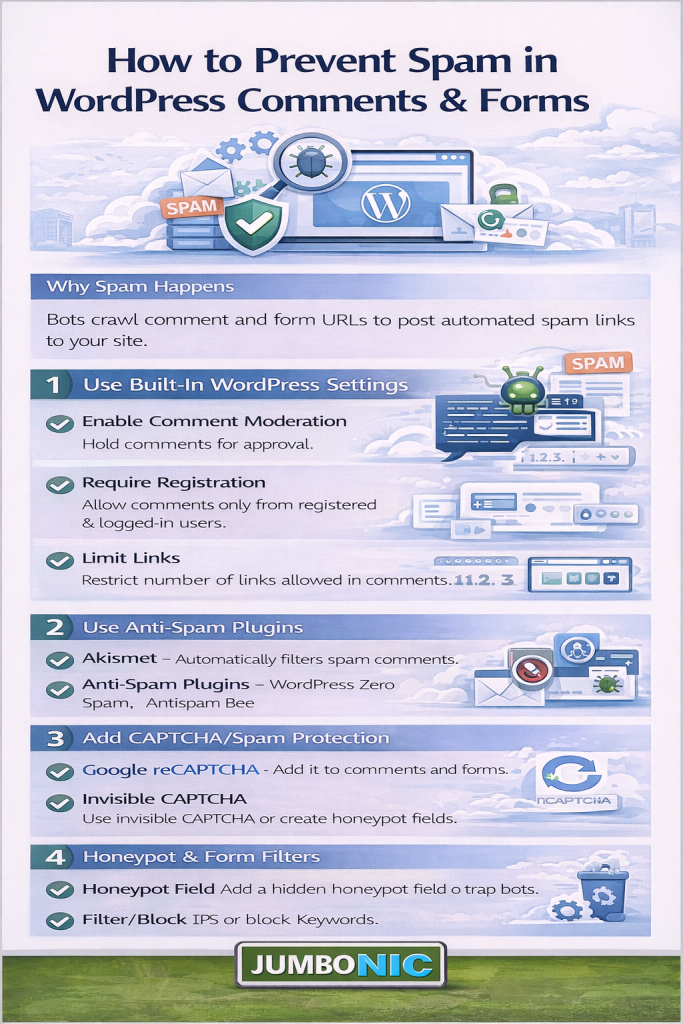
1. Why Spam Happens (and Why It’s a Problem)
Spammers target WordPress sites because they can easily exploit public comment sections and contact forms using bots or automated scripts. Their goals usually include:
Dropping backlinks to shady sites
Spreading malware or phishing links
Collecting email addresses for scams
Testing vulnerabilities for future attacks
The consequences go beyond inconvenience:
Spam comments make your site look unprofessional
Excessive spam can slow down your database
Google may penalize or flag your site for linking to harmful domains
JumboNIC Insight: On average, over 85% of all WordPress form submissions are spam-generated — unless you have active protection in place.
2. Use a Reliable Anti-Spam Plugin
One of the easiest ways to stop spam is by using an anti-spam plugin that filters suspicious activity automatically.
Popular choices include:
Akismet (official WordPress plugin)
Antispam Bee
CleanTalk
These plugins analyze comment content, user behavior, and IP reputation to block spam before it reaches your database.
JumboNIC Advantage: Our hosting platform integrates seamlessly with these plugins and includes server-level spam filtering, reducing spam load before it even reaches WordPress.
3. Enable Comment Moderation
Prevent spam from appearing publicly by enabling comment moderation. This gives you full control over what gets published.
Go to:
Dashboard → Settings → Discussion
Then:
Check “Comment must be manually approved.”
Hold comments that contain links or specific keywords.
Pro Tip: Limit the number of links allowed per comment (spammers often include multiple links).
JumboNIC’s Smart Moderation Tool helps streamline this process by flagging suspicious comments based on machine-learning detection patterns.
4. Add CAPTCHA or reCAPTCHA to Forms
Bots can’t easily solve CAPTCHAs, so adding one to your comment forms and contact pages is a powerful deterrent.
Best options:
Google reCAPTCHA v3 (invisible and user-friendly)
hCaptcha (privacy-focused alternative)
WPForms built-in CAPTCHA feature
JumboNIC Integration Tip: JumboNIC’s Form Security API supports automatic reCAPTCHA verification across popular WordPress form builders like Contact Form 7, WPForms, and Gravity Forms.
5. Use the “Honeypot” Technique
A honeypot is a hidden field that’s invisible to human users but visible to bots. When a bot fills it out, the system flags it as spam automatically.
Many plugins — including WPForms, Formidable Forms, and Fluent Forms — offer built-in honeypot protection.
JumboNIC Pro Tip: Combine honeypots with rate limiting (restricting rapid submissions from the same IP) for double-layered bot defense.
6. Disable Trackbacks and Pingbacks
Trackbacks and pingbacks were designed for blog-to-blog communication but are now mostly exploited by spammers.
To disable them:
Go to Settings → Discussion → Uncheck “Allow link notifications from other blogs.”
This simple change can drastically reduce spam attempts.
7. Block Known Spammers and IP Addresses
If spam is coming from the same IP ranges repeatedly, you can block them directly at the server level or via a security plugin.
Ways to block spammy IPs:
Add rules to your
.htaccessfileUse a plugin like Wordfence or Sucuri
Enable JumboNIC’s Smart IP Shield, which automatically blocks known spam networks and suspicious IPs across all hosted sites
8. Disable Comments Entirely (if You Don’t Need Them)
If your website doesn’t rely on user comments (for example, a business site or portfolio), you can simply turn comments off.
You can disable them globally through:
Settings → Discussion → Uncheck “Allow people to post comments.”
Or use the Disable Comments plugin to turn them off site-wide.
JumboNIC Suggestion: Many professional sites gain more by focusing on contact forms and live chat instead of open comment sections, reducing both spam and moderation workload.
9. Regularly Audit and Clean Your Spam
Even with anti-spam tools, some junk slips through. Regularly cleaning out your spam folder keeps your database lean and your site fast.
Clean-up tips:
Empty your spam and trash folders weekly.
Use a database optimization plugin to remove orphaned comment data.
Schedule automatic clean-ups through your hosting dashboard.
JumboNIC Hosting Panel includes AutoClean Tasks that periodically purge spam and unused data to keep your site performing at its best.
10. Monitor Spam Trends and Adjust Defenses
Spammers constantly evolve their tactics, so your defense must evolve too.
Use analytics and monitoring tools to spot patterns, such as:
Sudden spikes in form submissions
Repeated attempts from certain regions
Spam bursts following new blog posts
JumboNIC Security Dashboard gives you real-time insight into spam activity, blocked attempts, and IP reputation — allowing you to adjust protection instantly.
Final Thoughts
Preventing spam in WordPress comments and forms requires a mix of smart plugins, active moderation, and strong server-side protection.
While no single solution can eliminate spam entirely, combining multiple strategies — and hosting on a secure, intelligent platform like JumboNIC — ensures your site stays clean, fast, and professional.
With JumboNIC’s SmartDefense ecosystem, you can enjoy the benefits of WordPress without the constant battle against spam bots and fake submissions.
🧠 Keep Your WordPress Site Clean with JumboNIC
From automated spam blocking to intelligent threat monitoring, JumboNIC provides everything you need to keep your website secure, fast, and clutter-free.
Visit www.jumbonic.com to learn more about our WordPress security and performance tools designed for modern site owners.
